 ScreenShield
Share your screen, not your secrets.
ScreenShield blurs emails, phone numbers, card numbers and API keys right inside the page, before anyone on your call, in your recording or watching your stream can read them.
Free plan with no limits and no account. Pro from $4.99 a month, with a 7-day free trial.
| Name | Phone | Deal | |
|---|---|---|---|
| John Smith | john@acmecorp.com | (555) 012-3456 | $125,000 |
| Sarah Johnson | sarah.j@techstart.io | (555) 789-0123 | $89,500 |
| Mike Chen | m.chen@globalfin.com | (555) 456-7890 | $234,000 |
| Emily Davis | emily.d@retailco.net | +44 20 7946 0958 | $67,800 |
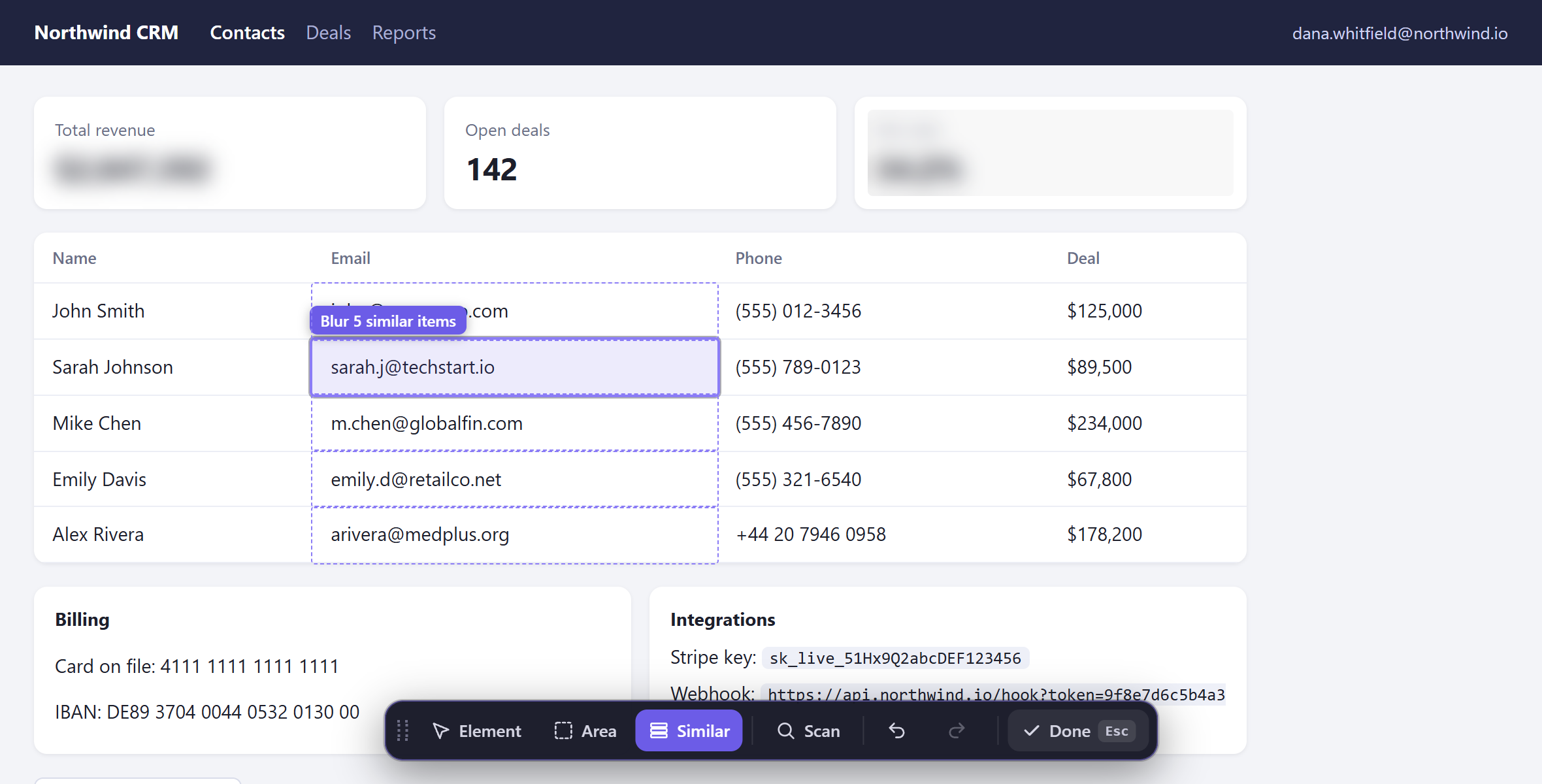
sk_live_51Hx9Q2aBcDeF0123456…/hook?token=9f8e7d6c5b4a3210A live demo with made-up data. Turn it off to see what your call would see without it.
Finds 16 kinds of sensitive info
Every check runs on your computer while the page loads. The free scan finds emails and phone numbers. Pro finds everything below and hides it on every site without you clicking anything.
| Type | Looks like | Plan |
|---|---|---|
| dana.whitfield@northwind.io | Free and Pro | |
| Phone number | +1 (555) 012-3456 | Free and Pro |
| Card number | 4111 1111 1111 1111 | Pro |
| IBAN | DE89 3704 0044 0532 0130 00 | Pro |
| US Social Security number | 078-05-1120 | Pro |
| IP address | 203.0.113.42 | Pro |
| IPv6 address | 2001:db8::8a2e:370:7334 | Pro |
| API key | sk_live_51Hx | Pro |
| Access token | Bearer 8f2ca1e9 | Pro |
| Token (JWT) | eyJhbGciOiJIUzI1NiJ9. | Pro |
| Private key | -----BEGIN PRIVATE KEY----- | Pro |
| Database URL | postgres://admin: | Pro |
| Secret in a link | …/reset?token= | Pro |
| Other secrets | password: Tr0ub4dor&3 | Pro |
| Crypto wallet | bc1qw508d6qejxtdg4y5r3zarvary0c5xw7kv8f3t4 | Pro |
| Money amount, if you turn it on | $12,400.00 | Pro |
| Your own keywords | Project Falcon | Pro |
Card numbers are checked with the Luhn algorithm and IBANs with their checksum, so order numbers and dates aren't hidden by mistake.
Turns on by itself when you share
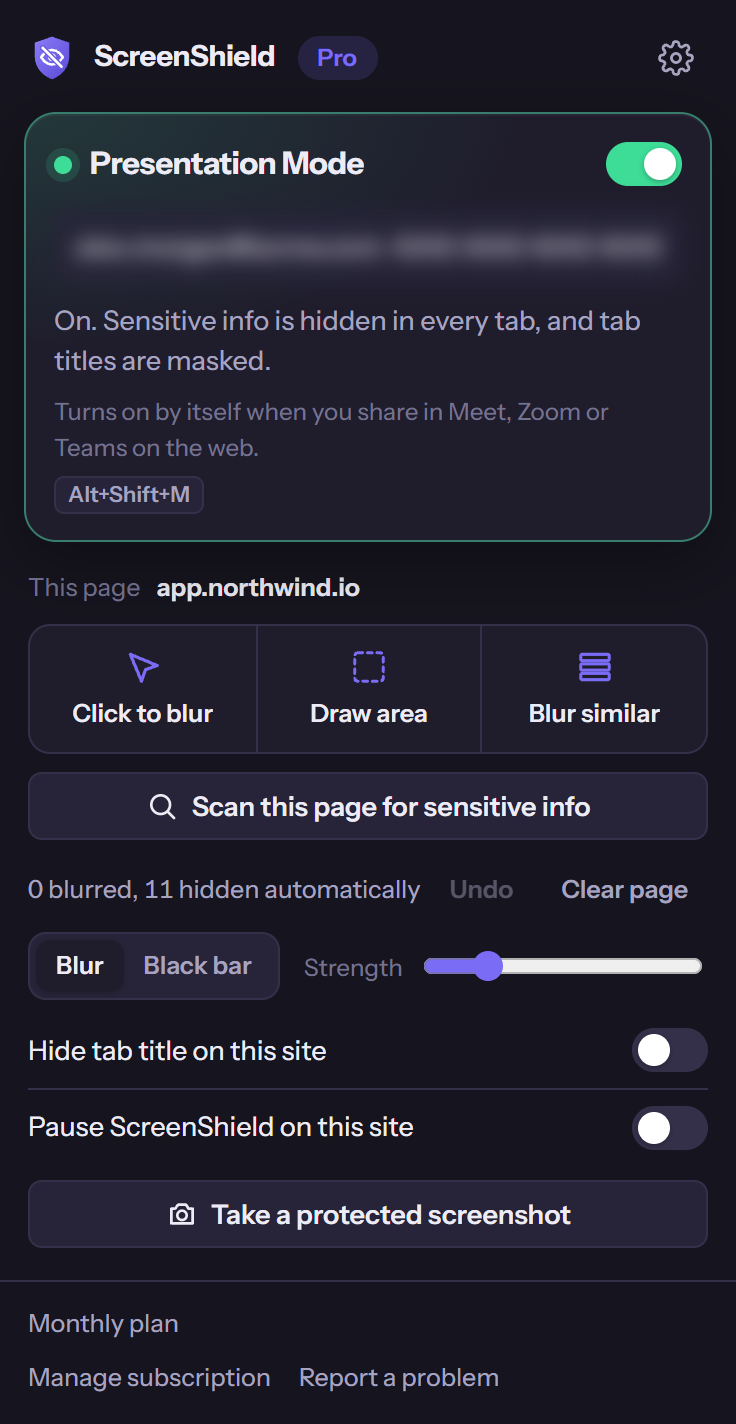
Presentation Mode protects every open tab for as long as you're sharing, so a quick switch to your inbox doesn't give anything away.
Start sharing in your browser
Present a tab, a window or your whole screen in Google Meet, Zoom or Microsoft Teams on the web, or another meeting app that runs in Chrome.
ScreenShield notices right away
Presentation Mode turns on and the toolbar icon shows ON. Sharing from a desktop meeting app? Press Alt+Shift+M.
Every tab is protected
Sensitive info is hidden in all your tabs, not only the one you're showing, and the titles of your other tabs are masked. When you stop sharing, everything goes back to normal.
Presentation Mode is part of Pro. Try it free for 7 days.
Blur anything by hand, free and unlimited
Your blurs are saved for each site and come back when you return, so you set up a page once.
Click to blur
Click any text, image, table cell or button. Click it again to unblur.
Draw area
Drag a rectangle over a chart, a sidebar or anything inside a canvas.
Blur similar
Click one email in a list and the whole column is blurred at once.
Also free: blur strength, hidden tab titles, a page scan for emails and phone numbers, undo, and a panic key, Alt+Shift+H, that hides the whole screen at once.
Free to start. Pro when you share every day.
Free
- Click to blur, draw areas and blur similar items, with no limits
- Saved blurs for every site
- Blur strength and hidden tab titles
- Page scan for emails and phone numbers
- Panic key, undo and redo, keyboard shortcuts
Pro
- Everything in Free
- Automatic detection of 16 kinds of sensitive info on every site
- Presentation Mode that turns on when you share
- Your own keywords and regular expressions
- Black bars, site-wide rules and protected screenshots
- Backup to a file and import on another computer
Launch offer: lifetime Pro for $29 until November 30, 2026.
Install and try Pro free for 7 daysPrices in US dollars. Payments are handled by ExtensionPay and Stripe. Cancel a monthly or yearly plan at any time from the ScreenShield popup. See the refund policy.
A privacy tool shouldn't see your data
ScreenShield doesn't. Read the privacy policy.
Runs on your computer
All detection and blurring happen inside your browser. Page content is never uploaded anywhere.
No tracking
No analytics and no ads. The free plan doesn't need an account.
Doesn't break websites
ScreenShield hides text without rewriting the page, so web apps like Gmail and Slack keep working.
Questions
Will the blur show up in my screen share and recordings?
Yes. The blur is applied to the page itself, so Meet, Zoom, Teams, Loom, OBS and any other app that captures your screen only see the blurred version.
Does it work with the Zoom and Teams desktop apps?
ScreenShield protects what's shown in Chrome. If you share a Chrome window or your whole screen from a desktop app, the web pages in it are protected. Automatic start only notices sharing that begins in the browser, so press Alt+Shift+M to turn on Presentation Mode yourself.
Can ScreenShield see or upload what's on my pages?
No. Pages are checked on your computer and nothing is sent anywhere. The only connection ScreenShield makes is to ExtensionPay, to check whether you have Pro.
Where doesn't it work?
Chrome doesn't let extensions run on chrome:// pages, the Chrome Web Store or other extensions' pages. Text drawn on a canvas, as in Google Docs, and text inside images can't be read, so cover those with Draw area.
Is it safe enough for passwords and full card numbers?
It lowers the risk a lot, but no tool catches everything. Look over your screen before you share something highly sensitive.
What happens when the free trial ends?
ScreenShield goes back to the free plan. You keep every blur you saved, and nothing is charged unless you choose a plan.
How do I cancel?
Open the ScreenShield popup and choose Manage subscription. You keep Pro until the end of the period you paid for.
Does it work in Edge or Brave?
Yes. Any browser that installs extensions from the Chrome Web Store can run ScreenShield.